
02 · Log
The photo fills in the log
Take the picture, confirm, correct. That hour's conditions write themselves.
The photo first
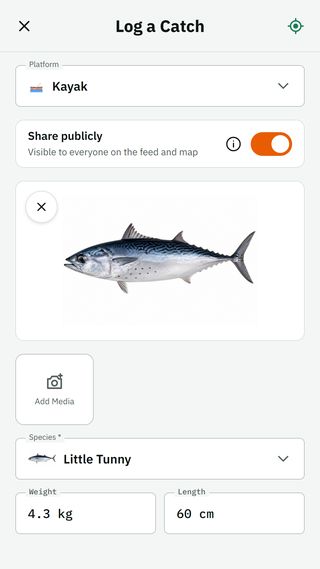
The moment a photo lands on the form, the app identifies the species, offers candidates to pick from, and estimates weight and length. Fields reveal as they fill, and you confirm or correct.
A species you chose yourself is never overwritten.
That hour's conditions
Wind, pressure, tide and sea state come from the forecast the app already fetched for that spot, for the hour of the catch.
Sea state is one rule, wave height plus wind, the same rule that draws the forecast chart.
Old photos
Import from the gallery reads the photo's time and location (EXIF) and asks a weather archive about that day. Air data goes back to 1940; waves to about 2022; sea temperature and tide only to late 2022.
Whatever is missing stays blank. The app does not guess.
Drafts, photos, export
A draft is kept only when you choose "Save as draft"; a silent safety copy also survives the system killing the app. Each catch takes up to three photos on Free and ten on Premium, and a "Released" mark.
Full CSV export, free, any time.
Questions
- What if the identification is wrong?
- Tap the species field and pick from the candidates or the catalogue. A species you chose yourself stays.
- Can I log without a photo?
- Yes. A "manual entry" link opens every field.
- Where do the conditions of an old catch come from?
- From an archive, by the day and place in the photo. What the archive lacks stays blank.
Get on the water.
Installing is free. Your data stays yours.